
Key ideas
- Answer engine optimization (AEO) means shaping your content so AI tools like ChatGPT, Claude, and Gemini can find it, understand it, and cite it.
- The animal protection movement needs its work to be easy for AI tools to find, because more people now get their information from them. If it isn’t, other sources will shape the answers people get about animals.
- When optimizing content for AI, prioritize strong search engine optimization (SEO), establish credibility, keep content current and accessible to both machines and people, and structure information as answers to the questions people ask.
- In a pilot study with Bryant Research, adding a short “Key takeaways” box took one page from never being cited by AI tools to being cited in both later test runs, but made no clear difference to the others. AEO changes can work, but test them before assuming they do.
- We recommend running an AEO audit to measure how often AI tools cite your work and to track which changes help over time.
- AEO is new and there’s little hard evidence on what works, so we’d like to see more organizations test it and share what they find.
What is answer engine optimization (AEO)?
Animal advocacy organizations are among the leading experts on animal welfare, social change, campaign strategy, and which interventions help animals most. But our movement’s work may not be showing up where more and more people now go for answers: AI tools like ChatGPT, Claude, and Google’s AI Overviews. Companies outside the movement are already optimizing their content for these tools. If we don’t adapt our content strategies too, our work risks disappearing from view.
You don’t have to overhaul your whole strategy to adapt. A few changes to formatting, content, and “crawlability” (whether AI tools can reach and read your pages) can make your organization easier to find and cite on the issues you know best.
Answer engine optimization is the practice of making content easy for AI “answer engines” to find, understand, and cite. These include ChatGPT, Claude, and Gemini, as well as AI built into other software, like Google Search’s AI Overviews. Like traditional search engines, AI tools favor content that is clear, authoritative, credible, and well structured. AEO builds on SEO by adding a focus on “answer-first” content: direct, evidence-based answers to common questions.
You don’t need technical skills to get started. The checklist below covers the changes we’d make first. Most don’t need a web developer, and all of them make your content easier for people to read, too.
The AEO checklist
- Make your website’s content accessible to AI. Check that AI tools can reach your pages (that they’re “crawlable”) and that your key points are written as text on the page, not only inside images, infographics, or PDFs. Comparison tables and lists written in plain text are also easy for AI to pick up. If you’re not sure what AI tools can see, paste the link into one and ask it to describe what’s on the page. To check whether your website lets AI crawlers in at all, see our guide to robots.txt and llms.txt.
- Add a short summary, like a TL;DR (“too long; didn’t read”) or “Key ideas” box, at the top of your pages and reports. Take an “answer-first” approach: give direct, evidence-based answers to the main questions the page covers, in words AI tools can quote as they are. You can also phrase headings as the questions people actually ask (for example, “Is aquaculture factory farming?”), so each section reads as a ready-made answer.
- Publish original, well-evidenced content. Include your own data, named authors, citations, and concrete examples. Google’s advice on helpful content asks whether a page offers “original information, reporting, research, or analysis” and “substantial value when compared to other pages in search results.” Google says the same advice applies to its AI features, such as AI Overviews.
These overlap with SEO best practices, because good SEO is also good AEO.
What is an AEO audit?
An AEO audit tests how often AI tools mention or link to your organization when people ask about the topics you cover. You ask a set of questions, then count the answers that cite you. This is your AI visibility, and you can express it as a percentage (for example, “our site was cited in 5% of answers”). Run the audit before and after you change your content to see whether the changes made a difference.
How to run an AEO audit
- Choose the content you want to optimize: one page, several articles, or a whole section of your site. Also choose at least two pages you won’t change during the experiment. These are your controls, and they show how much your results shift on their own.
- Write 50 to 100 questions you’d like your chosen pages (including the control pages) to be cited for in AI answers. Think about which questions your content answers directly, and who it’s written for: the general public, journalists, industry, and so on. For example, if your content is about plant-based food in institutions, questions might include “How can a university, hospital, or cafeteria be convinced to offer more plant-based options?” or “What are the most effective ways to increase plant-based food consumption in cafeterias?” If 50 to 100 sounds like a lot, that’s roughly 10 to 20 per page for five pages, and AI can draft most of them for you with the prompt below. In our case study, we used 85.
Prompt for drafting your questions
For these web pages [insert a list of the web pages you selected above], generate a spreadsheet of [100] questions that [insert org name] might want to show up as a citation for in AI-generated responses. Link to the page on the website that should be cited for each question. Include a mix of questions that different types of audiences might ask (the general public, industry, researchers, policymakers, etc.) and label the audience type for each question. Before you do this, ask me any clarifying questions you need answered to do the task well.Longer-term, higher-effort strategy: pick specific questions you want your organization to be cited for (AI can help you choose them), and create pages that answer exactly those questions.
- Read through the questions yourself and pick the ones you want to test.
- Run the questions through one or more AI models. You can ask a small set by hand, or have AI automate the process (see the next step). If you ask the questions in your own AI account, use a temporary or “incognito” chat so the answers aren’t shaped by what the tool remembers about you from other chats.
- To test several AI models at once, you can use OpenRouter (a service that gives you access to many AI models in one place) together with the prompts below. The prompts are written for an AI tool that can create and run files on your computer, such as Claude Code or OpenAI Codex. You’ll need to add credit to an OpenRouter account and create an API key: a password that lets your experiment spend that credit. When you create the key, you can give it a spending limit, so a mistake can’t spend more than you planned. Expect to pay: experiments can cost upwards of $50, sometimes considerably more. More models and questions give you more data, which makes it easier to tell whether your changes actually helped or whether results moved by chance (AI tools give a slightly different answer every time). They also raise the cost.
Before you start, make a new folder for the experiment. Put your questions in it as a file called questions.csv (most spreadsheet apps can save a sheet as a CSV file), and save your API key there in a file called .env. If you’re not sure how to make that file, ask your AI tool to create an empty one for you, then paste your key into it yourself, so the key never appears in the chat.
Prompt 1
I'm not a programmer, so please explain anything technical in plain English and do the coding for me.

In this folder there's a file holding my OpenRouter API key. It should be called ".env". Please don't open it or show me what's inside. Just check that it exists, and tell me the name of the setting inside it (not the value) so we use the right name in the code.
Prompt 2
My org's website: [insert website URL here]
Models I want to test: [name the models, for example two from OpenAI, two from Anthropic, and two from Google]

I'm running an experiment on answer engine optimization (AEO). I want to see whether changes to my org's website make it come up more often when people ask AI tools questions about its topics.

I've created a list of questions, stored in the "questions.csv" file in the project folder.

Please write a Python script that runs the experiment. Here's what it should do:
- Read the questions from questions.csv.
- Send each question to each of the models listed above using the OpenRouter API, with OpenRouter's web search switched on. Check OpenRouter's current documentation for how to switch it on.
- Before you start, check on https://openrouter.ai/models that these model names are still correct.
- Send only the question itself, with no extra instructions, so the answers are as close as possible to what a normal user would get.
- Read the API key from the .env file without showing it to me.
- Save the results to a new spreadsheet file with the date and time in its name, with one row per question per model and these columns: question id, question, topic, model, the full answer, the list of web links the answer cited, whether the answer mentions my org by name (yes/no), whether any cited link is on my org's website (yes/no), and the time.
- If a request fails, try it again a couple of times, then record the error in the spreadsheet and carry on.
- At the end, print a short summary: for each model, the percentage of answers that mention my org and the percentage that link to its website, plus the overall percentage.
- Let me choose to run only the first few questions, so I can test it cheaply.

Please run it now on just the first 5 questions. Then tell me how much that cost (OpenRouter shows the usage for my key at https://openrouter.ai/api/v1/key) and roughly how much a full run of all the questions would cost.
Run the experiment at least four times: twice before you make any changes and twice after. Comparing two runs of the same pages shows how much the answers vary by chance, so you can tell whether your changes made a real difference. In our case study, we ran the “before” test only once, which made the results harder to interpret.
Prompt 3
Please run the full experiment on all the questions two times and save the results as BEFORE run 1 and BEFORE run 2.- Choose one or more changes from the checklist above and make them on the pages you chose in step 1.
- Once the changes are live, wait at least one to two weeks so search engines can pick them up. Then run the same questions through the same models twice, as AFTER run 1 and AFTER run 2.
- To compare the results, first count how many answers switched between citing you and not citing you from one “after” run to the other. Nothing on your site changed between those runs, so this shows how much answers vary by chance. Then count how many switched between “before” and “after”. If the before-to-after change is clearly bigger, and mostly in your favor, your changes probably made your content more visible. You can ask AI to run this comparison for you and check whether the difference could be down to chance.
- Make the changes that worked across the rest of your site, and build them into how you write new content.
- Rerun the audit at least every six months and adjust as you go. AI models change often, so what works today may not work as well a few months from now.
Bonus: ask AI to set up the audit to run automatically, for example every two to three months.
Case study: Bryant Research
For this guide, Angelique Rein ran a small experiment with Elise Hankins at Bryant Research. We added a summary box with a “Key question” and “Key takeaways” to the top of five of Bryant Research’s “insights” (blog posts about their research). We then asked three OpenAI models (GPT-5.6 Terra, GPT-6 Luna, and GPT-6.1 Sol) 85 questions, once before the page edits and twice after. Run through OpenRouter, the three runs cost $35.52 in total.
The main finding: the summary box is quick and cheap to add, and one page saw a clear gain after it was added, but it wasn’t a win across the board. Overall, the share of AI answers that mentioned or linked to Bryant Research rose from 3.9% before the changes to 4.3% and then 5.1% in the two “after” runs. That rise is too small to rule out chance, but the page-by-page results are more telling.
Website changes
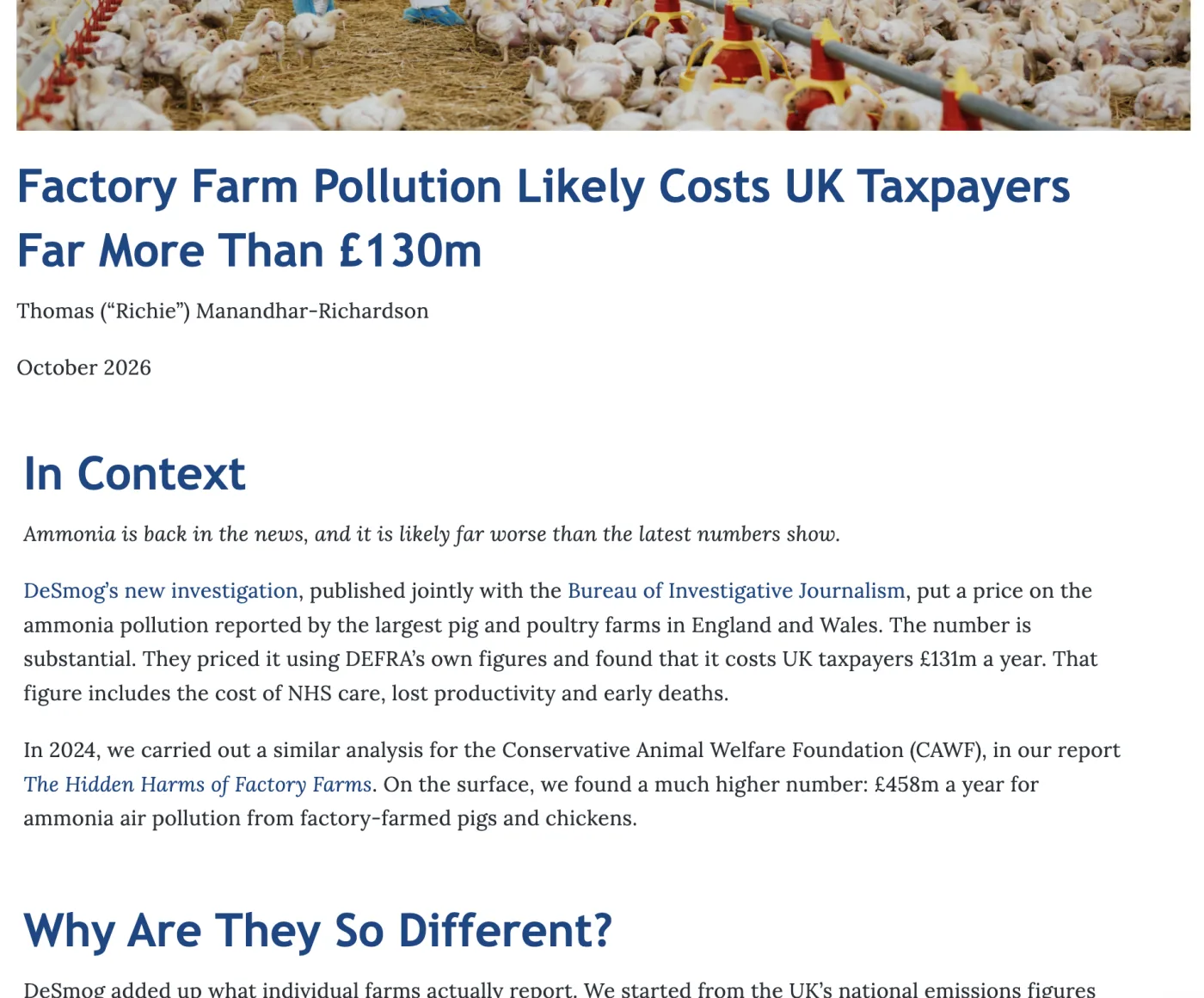
Before: the page opened straight into its first section.
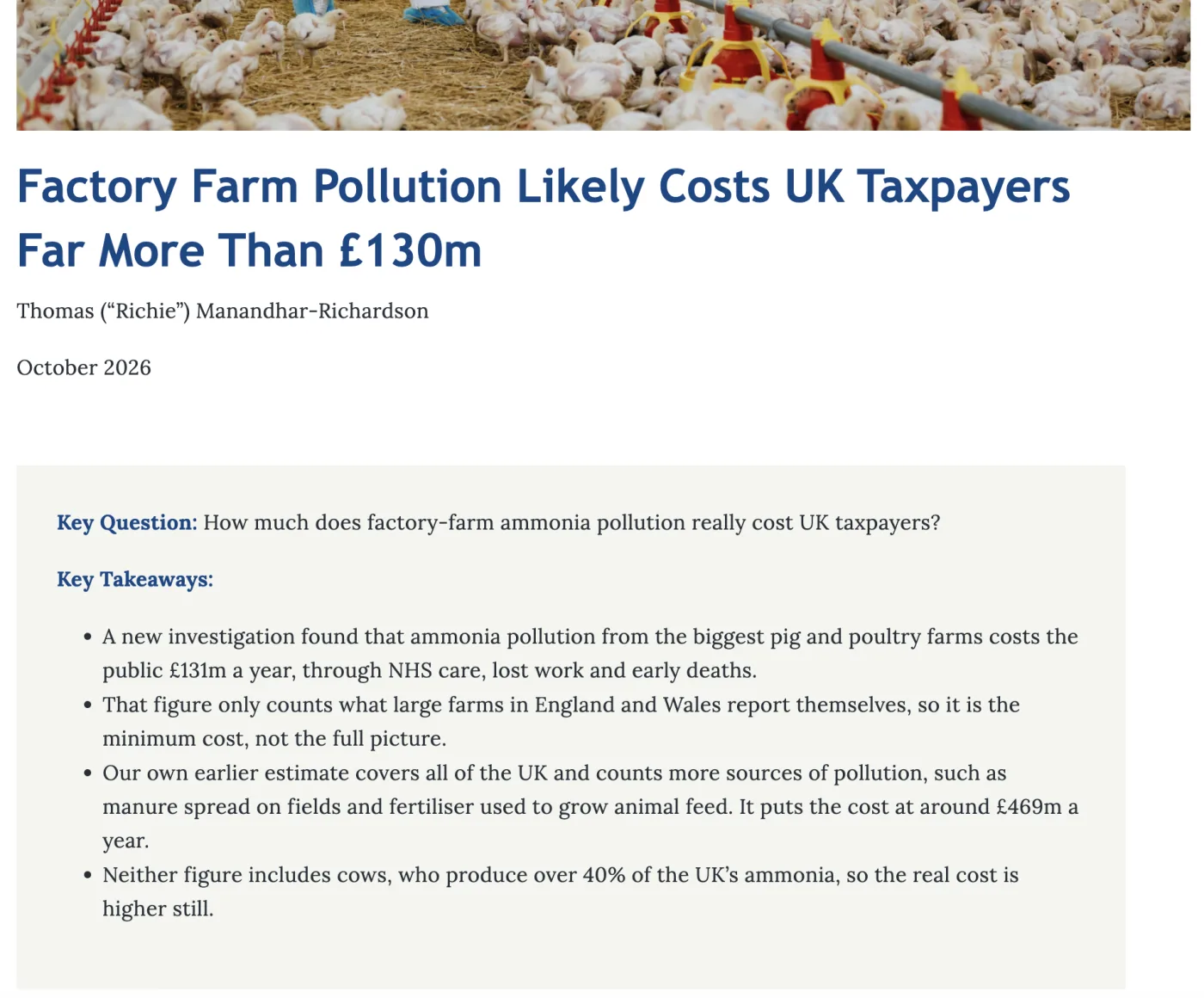
After: a summary box with a “Key question” and “Key takeaways” sits under the title.
Results, page by page
One page did better: The factory farm pollution page (shown above) went from 0 citations before the change to 4 and then 6 in the two “after” runs, across all three models. A jump that big would be unlikely if the summary box had made no difference (about a 3% chance). But the page was only 10 days old when the test started, so search engines catching up with a new page may explain some of the gain.
One page lost ground: The page on the UK government’s Farming Roadmap 2050 went from 3 citations to 0 and then 1. Chance could explain part of the dip. Another possibility is that a different site made the same arguments as Bryant’s post and seemed to be a more favored source to cite. If this happens to one of your pages, look at which other sources the AI tools cited instead, and see what original evidence or claims your page could add. In the “after” runs, the only question this page was cited for was the “Key question” from its new summary box.
One page stayed strong: The plant-based labeling page was already the most cited and stayed that way (6, 7, and 6 citations). The change neither helped nor hurt it.
Two pages were never cited: The pages on water use by AI versus animal agriculture and on the plant-based comeback were not cited in any run. A summary box alone may not be enough for pages that AI tools aren’t finding in the first place, or where the topic is popular and there is competition.
What we’d do differently: We didn’t include control pages, we ran the “before” test only once, and we tested only OpenAI’s models. In an earlier eight-model mini-trial, Google’s Gemini models cited Bryant Research more often than OpenAI’s models did, so results may differ by AI tool. The audit steps above address all three limitations. With extra resources, we recommend testing more regularly and experimenting with other models and site changes.
Bottom line
Most of what helps AI tools find and cite your work also makes it more useful to people and better for search: clear answers up front, readable text, and original evidence. Our case study shows these changes can work, but not on every page and not overnight. So start small: pick a few important pages, make the changes from the checklist, and run an audit before and after to see what helps. When people ask AI about animals, we want the answers to draw on the organizations that know the issues best. If you run your own test, reach out to us and share what you find.
Angelique Rein wrote this guide as a mentee in the Sentient Futures Project Incubator. Thanks to Elise Hankins and Bryant Research for taking part in the case study.
